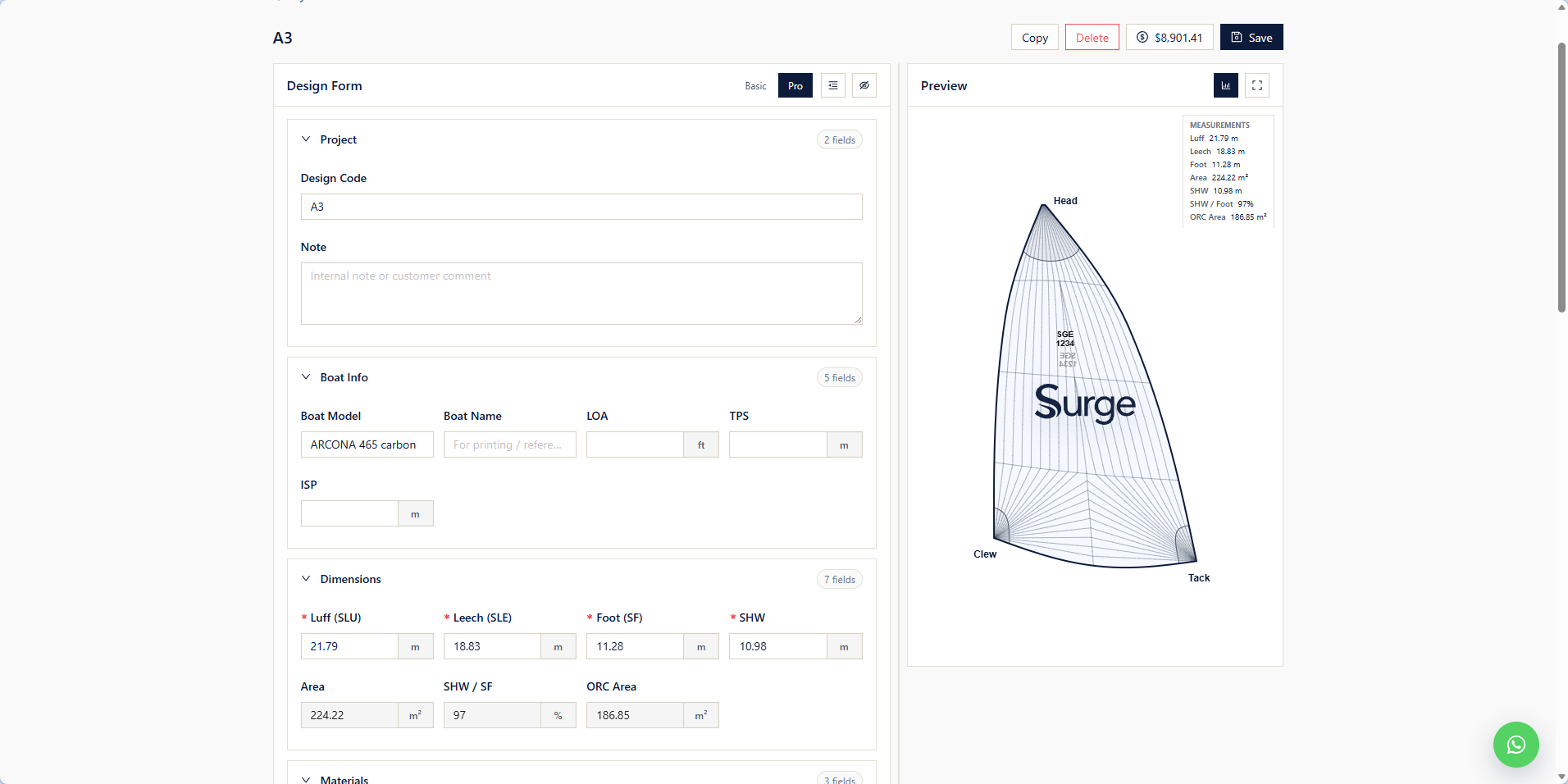
The design form is where the whole sail comes together — boat, dimensions, cloth, systems, hardware, and look — with the preview and the price updating as you go.
The form walks top to bottom through every part of the sail. You do not have to fill it perfectly the first pass; the preview updates live, and a sailmaker confirms the spec before production. This page is the reference for what each field means.
- Have your boat record ready — it drives the dimensions.
- Not sure which sail or cloth to pick? Read the Sail Library first.
- Prefer a head start? The AI Design Studio proposes a full configuration you can then edit here.
Project
Project information helps identify and organize your sail designs.
Design Code
A unique name or identifier for the sail project.
Example:
- A3
- Main 2026
- Offshore Jib
Note
Add internal notes or customer comments for future reference.
Boat Info
Boat information is used to calculate sail geometry and validate dimensions.
Boat Model
Select your boat from the database.
Boat Name
Optional boat name used for project identification.
LOA
Length Overall of the boat.
TPS
Tack Point to Sheave measurement.
ISP
Spinnaker hoist measurement.
Dimensions
Enter the primary sail dimensions.
Luff (SLU)
Length from the head to the tack.
Leech (SLE)
Length from the head to the clew.
Foot (SF)
Length along the foot of the sail.
SHW
Half-width measurement.
Area
Calculated sail area.
SHW / SF
Ratio between half-width and foot length.
ORC Area
Calculated measurement used for ORC racing certificates.
Materials
Select sailcloth and panel colors.
Cloth
Choose the sail material.
Available materials (read each for the full spec):
- Palma — value woven polyester
- Newport — premium woven cloth
- Baltic UAX — performance laminate
- FiberMAX — composite laminate
Base Color
Primary color of the sail.
Panel Colors
Select individual panel colors or apply one color to all panels.
Systems
Configure sail systems and functional options.
Has Furling
Enable if the sail will be used with a furling system.
Retrieval Patch
Adds a reinforced retrieval patch for easier sail recovery.
Patch Style
Select reinforcement style.
Rope Catcher
Configure rope catcher if required.
Release System
Choose the release mechanism.
Luff Line
Configure luff line material and diameter.
Leech Line
Configure leech line specification.
Foot Line
Configure foot line specification.
V Stripes
Add visual stripes for sail identification.
Hardware
Configure hardware installed on the sail.
Tape Color
Select webbing or tape color.
Head Ring
Select ring type and size for the head.
Clew Ring
Select ring type and size for the clew.
Tack Ring
Select ring type and size for the tack.
Accessories
Additional accessories supplied with the sail.
Stasher
Include a stasher if required.
Bag Type
Select sail bag type.
Examples:
- Turtle Bag
- Standard Bag
Certification
Select certification if required.
Visual
Customize the appearance of the sail.
Sail Number
Enter the sail number.
Sail Number Color
Select text color.
Sail Number Size
Choose character size.
Show Logo
Enable or disable the sail logo.
Logo Image
Upload a custom logo.
Logo Width
Adjust logo size.
Logo X
Move the logo horizontally.
Logo Y
Move the logo vertically.
Logo Rotation
Rotate the logo.
Preview
The Preview panel displays the sail as it is configured.
Displayed information includes:
- Sail outline
- Panel layout
- Sail graphics
- Measurements
- Calculated sail area
The preview updates automatically whenever configuration values change.
Advisor Note
Once your design looks right, it goes to a sailmaker for review before production — so you are never ordering blind off the form. Designs you save appear in My Sails, where you can edit, duplicate, or submit them for quotation.